Scripture before the screen.

At the time you set, The Quiet Time takes over your phone until you have read, prayed and written.

See a morning
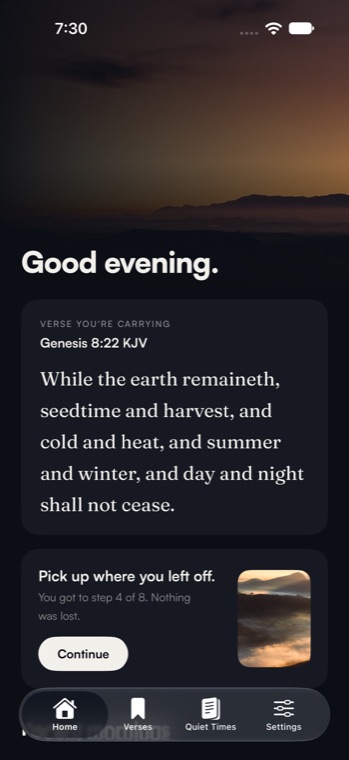
The home screen: today's verse, Genesis 8:22, and a button to pick up where you left off.

Eight steps, about fifteen minutes.

The same order every morning, so there is nothing to decide. You can pick it up again if the day interrupts you.

  1. MemoriseMeet the verse you will carry today.
  2. PrayA quiet moment before you read.
  3. ReadA chapter in the translation you choose, with room to note any verse.
  4. LearnSay what you learnt, in your own words.
  5. Reading guideQuestions to read the passage by.
  6. JournalWrite the morning down.
  7. Pray againTake it into the day.
  8. RecallSay the verse from memory, aloud or typed.

Made for the same hour every day.

Read it in the words you know.

Switch translation mid-chapter. Tap a verse to leave a note, and the app remembers which version you wrote it on.
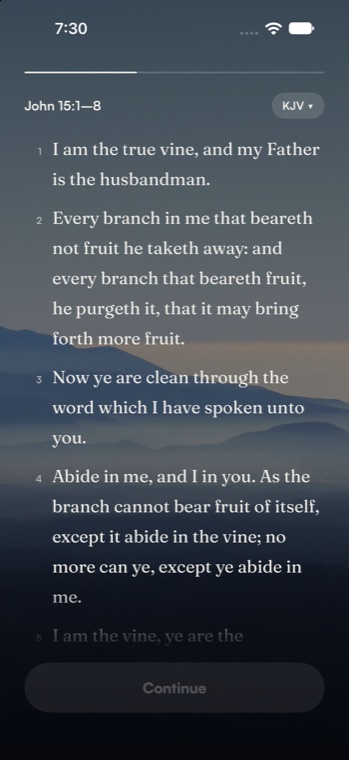

John 15 in the reading step, with verse numbers and a translation switcher.

Be still, and know that I am God.

Carry one verse at a time.

Say it back from memory, out loud if you like. Your voice is turned into text on your phone and is never recorded.

Every morning, kept.

A title, what you learnt, your notes on verses and your journal. Search them by word or book on any phone you sign in to.
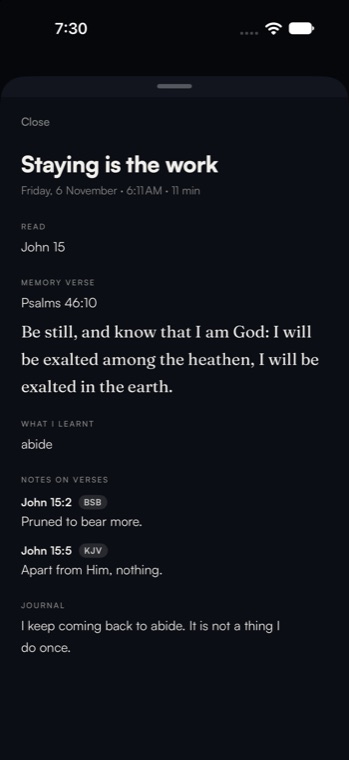

A saved quiet time with its title, memory verse, what was learnt and notes on verses.

A takeover that lets go.

One snooze, and a way out when something urgent comes up. It is a nudge, not a lock.

What stays yours.

Your writing is yours.We keep a copy so it follows you to a new phone. We do not sell it, and we do not use it for advertising.
Your voice stays on your phone.Reciting a verse out loud is turned into text on the device. The audio is not recorded or sent anywhere.
Delete it all, any time.One button in Settings erases your account and everything stored online.
Read the privacy policy

Set the hour once.

Then let the morning find you.